How to Interface STM32F4 with SD Card Using SPI and Implement FatFs
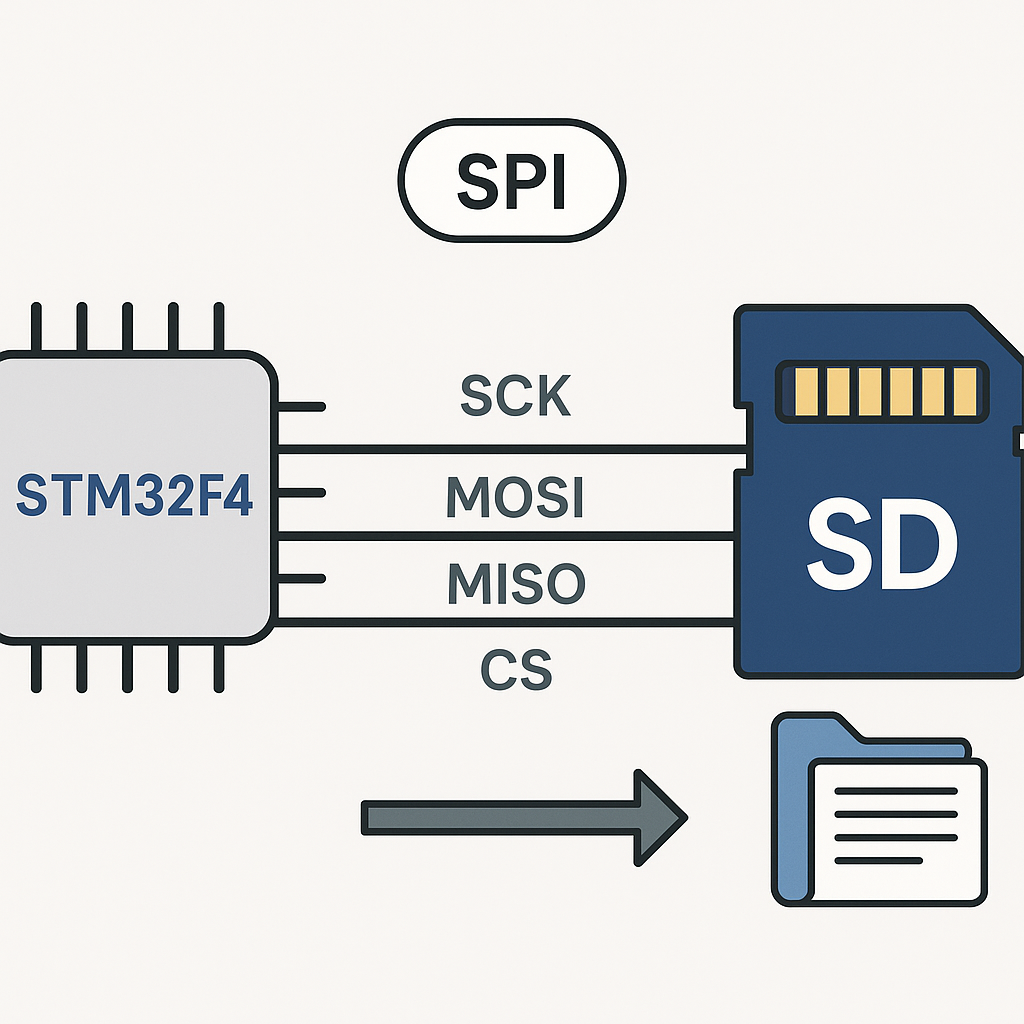
SD Cards on STM32: The SPI + FatFs Approach
Need to log data, store configs, or save files from your STM32F4? An SD card over SPI is the simplest way to get removable storage working. You don't need an SDIO peripheral — plain SPI works fine for most use cases, and every STM32 has multiple SPI buses available.
The FatFs library handles the filesystem layer so you can use standard file operations (open, read, write, close) instead of dealing with raw sectors. STM32CubeIDE (v1.16+) even includes FatFs as a middleware option, so integration is straightforward.
Prerequisites
- Working knowledge of C and STM32 HAL basics
- An STM32F4 board (Discovery, Nucleo, or custom)
- A MicroSD card formatted as FAT32 (cards up to 32GB work natively with FAT32; larger cards need exFAT which FatFs supports but requires additional config)
- STM32CubeIDE v1.16+
Parts and Tools
- STM32F4 development board
- MicroSD card breakout module (the ones with a built-in 3.3V regulator and level shifter are ideal)
- MicroSD card (class 10 or better recommended)
- Jumper wires
- Computer with STM32CubeIDE installed
Steps
- Wire the SD Card Module to the STM32F4
SPI needs four lines: clock, MISO, MOSI, and chip select. Here's a typical wiring using SPI1:
STM32F4 Pin    SD Module Pin
-----------    -------------
PA5            SCK (Clock)
PA6            MISO (Data Out)
PA7            MOSI (Data In)
PA4            CS (Chip Select)
3.3V           VCC
GND            GND
If your SD module has a 5V input and onboard regulator, you can power it from 5V instead. But the SPI data lines must be at 3.3V logic levels — most breakout boards handle this with level shifters.
Tip: keep the SPI wires short. SD cards can be finicky about signal integrity, especially at higher clock speeds. If you're on a breadboard and getting intermittent failures, long wires are the first suspect.
- Configure SPI in STM32CubeIDE
- Create a new project for your STM32F4 board.
- In the CubeMX Pinout view, enable SPI1 in "Full-Duplex Master" mode.
- Set the SPI parameters: Mode 0 (CPOL=0, CPHA=0), 8-bit data size. Start with a low prescaler (like /256) to get a slow clock — SD card initialization must happen at 400kHz or below. You'll speed it up after init.
- Configure PA4 as a GPIO Output for the CS pin (don't use hardware NSS — you want manual control).
- Under Middleware, enable FATFS and select "User-defined" as the disk interface since you're using SPI, not SDIO.
- Generate the code.
- Implement the Disk I/O Layer
FatFs needs a low-level driver that talks to the SD card. When you select User-defined FATFS in CubeMX, it generates skeleton files (
user_diskio.c) that you need to fill in. The key functions are:DSTATUS USER_initialize(BYTE pdrv) { // Send 80+ clock pulses with CS high (SD card init sequence) // Then send CMD0 to enter SPI mode // Send CMD8, ACMD41 to initialize // Switch SPI clock to full speed after successful init return RES_OK; } DRESULT USER_read(BYTE pdrv, BYTE *buff, DWORD sector, UINT count) { // Send CMD17 (single block) or CMD18 (multiple block) read commands // Receive data via SPI into buff return RES_OK; } DRESULT USER_write(BYTE pdrv, const BYTE *buff, DWORD sector, UINT count) { // Send CMD24 (single block) or CMD25 (multiple block) write commands // Transmit data via SPI from buff return RES_OK; }Writing a full SD card SPI driver from scratch is doable but tedious. I'd recommend grabbing a proven implementation — search for "STM32 SD SPI FatFs driver" and you'll find well-tested open source versions. The ChaN FatFs project itself includes sample drivers. Adapting an existing one to your pin configuration takes minutes vs. hours of debugging a new one.
- Mount the Filesystem and Test
In your
main.c, mount the filesystem and try a basic write/read cycle:FATFS fs; FIL file; FRESULT fres; UINT bytesWritten, bytesRead; char readBuf[64]; // Mount the SD card fres = f_mount(&fs, "", 1); if (fres != FR_OK) { // Handle mount failure Error_Handler(); } // Write a test file fres = f_open(&file, "test.txt", FA_WRITE | FA_CREATE_ALWAYS); if (fres == FR_OK) { f_write(&file, "Hello from STM32F4!", 19, &bytesWritten); f_close(&file); } // Read it back fres = f_open(&file, "test.txt", FA_READ); if (fres == FR_OK) { f_read(&file, readBuf, sizeof(readBuf), &bytesRead); f_close(&file); // readBuf now contains "Hello from STM32F4!" }Always check the
FRESULTreturn values. FatFs has specific error codes (FR_DISK_ERR,FR_NOT_READY, etc.) that tell you exactly what went wrong.
Troubleshooting
- f_mount returns FR_NOT_READY: The SD card isn't initializing. Check your wiring, make sure the init sequence uses a slow SPI clock (400kHz max), and verify the card is FAT32-formatted. Try a different card — some cheap cards have flaky SPI support.
- Reads work but writes fail: Some SD modules have a write-protect switch. Check that. Also make sure you're closing files properly —
f_close()flushes the write buffer. If the power cuts before close, you'll lose data. - Intermittent communication errors: SPI clock might be too fast for your wiring. Drop the prescaler and work your way up. On a breadboard, I rarely go above 4MHz reliably. On a PCB with proper traces, 12–18MHz is reasonable.
- FatFs functions return FR_DISK_ERR: Your disk I/O layer has a bug. Add debug prints inside
USER_readandUSER_writeto see which SD command is failing. The most common issue is incorrect CS pin handling — CS must go low before each command and high after. - Only works once after power-on: You might be leaving the SPI bus or CS pin in a bad state. Make sure your init sequence starts clean: set CS high, send 80 dummy clock cycles, then proceed with CMD0.
Wrapping Up
SPI + FatFs is the go-to recipe for SD card access on STM32 when you don't have or don't need SDIO. The trickiest part is the disk I/O driver — once that's solid, everything else just works. For data logging applications, consider using f_sync() periodically instead of open/close cycles to minimize the window for data loss if power drops. And if you need better throughput, look into the SDIO peripheral with DMA, which is significantly faster but requires more pins and a different driver approach.